The Golf Course
A whole issue of INPUT magazine, typed in blind and left to render for the length of a coffee break — and a brother who wanted to know why none of it was a game.
Site owners note- whilst Tetris in ZX Basic is possible, it is very slow and effecivitely unplayable. Think twice before downloading and investing any time.
Everything else in this corner of the site — Gig Rush, the Raiders games, Isocubes, Minion — is hand-assembled Z80 machine code, built with Pasmo. This one is deliberately the opposite: a complete Tetris written in the Spectrum's own built-in, line-numbered, interpreted Sinclair BASIC — the thing that actually greeted you when a real 48K Spectrum finished booting. No cross-compiler, no assembler, just the language and the ROM every Spectrum shipped with.
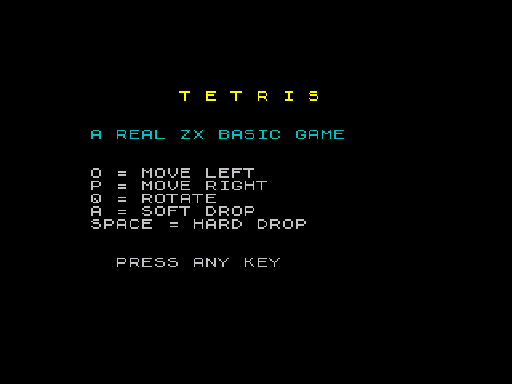
It has all seven standard tetrominoes with proper rotation, a next-piece preview, line clearing with scoring, an increasing level speed, and a game over screen. It's also a good excuse to talk about what interpreted BASIC is actually like to write fast, real-time-ish code in — including two ROM quirks that flat-out crashed the first two attempts.
The obvious way to draw a coloured block in BASIC is
PRINT AT y,x; INK n; PAPER n;" ". It also happens to be far too
slow to move a falling piece every frame — each PRINT AT re-enters the
ROM's output routine and processes embedded colour-control codes on top of
the character output itself. The playfield here is drawn a different way:
POKEing colour attribute bytes directly into the 22528–23295
range, with the character underneath left as a permanent blank space.
That works because a blank bitmap cell only ever shows its paper colour — there's no ink pixel to clash with, so changing the attribute byte alone is enough to make a solid coloured block appear or disappear. Moving a piece down one row costs eight single POKEs (erase four cells, draw four cells) instead of eight full PRINT AT statements:
@cellattr:
if cr<1 then return
let addr=22528+(boardtop+cr-1)*32+(boardleft+cc-1)
poke addr,cv
return
Each tetromino's four rotation states are sixteen numbers — four
cells, each a (row, column) offset inside a 4×4 box — sitting in
a DATA block and read into an array once at start-up:
# --- T piece ---
data 0,1,1,0,1,1,1,2
data 0,1,1,1,1,2,2,1
data 1,0,1,1,1,2,2,1
data 0,1,1,0,1,1,2,1
Rotating a piece is then just picking the next rotation index and re-reading four offsets — no matrix rotation math, no special-casing. Falling, landing, and hard-dropping all share one collision check that walks those four cells against the board array and the playfield edges.
Machine code games on this site drive their timing off the raw 50Hz
interrupt. BASIC doesn't hand you that directly — but the ROM still
counts frames for you, in the three-byte FRAMES system variable
at address 23672. A zero-argument DEF FN turns that into a
one-line stopwatch:
def fn t()=peek 23672+256*peek 23673+65536*peek 23674
The main loop compares FN t() against the frame count at the
last drop, and only calls the drop routine once enough real time has passed
— so gravity speeds up smoothly as the level increases, independent of
how fast the interpreter itself happens to be chewing through the rest of
the loop.
Both of these produced an immediate, opaque Nonsense in BASIC
or Out of screen report the first time they were tried, and
neither is obvious from how the language reads:
DIM board(20,10) and FOR row=1 TO
20 both fail outright — ordinary LET variables
can be any length (dropinterval, boardtop and
friends are fine), but the moment a name is DIM'd or driven
by FOR, it has to shrink to one character. The whole program
is full of terse single-letter names like a for the board and
s for the shape table — not a style choice, a hard ROM
restriction.DF_SZ), so
PRINT AT 22,0 raises Out of screen on a stock
48K machine. The whole layout — playfield, border, side panel —
had to fit inside rows 0–21.This is the part a machine-code demo doesn't have to talk about: interpreted BASIC is slow, and a Tetris piece falling under gravity here moves at roughly one row every second and a half at level one — measured directly off the emulated frame counter, not guessed. That's not a bug to apologise for; it's what real, unaccelerated Sinclair BASIC costs you for every array lookup and GOSUB in the hot path, and it's exactly why every other program on this site is written in assembler instead. SPACE hard-drops a piece instantly (or as instantly as the interpreter allows), which is the practical way to actually play it rather than waiting out gravity.
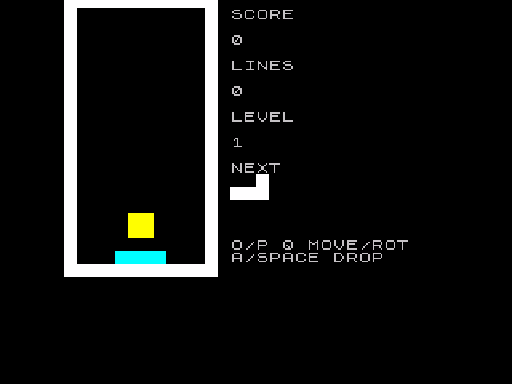
LOAD "" auto-starts it.zmakebas -l -a @entry -o tetris.tap tetris.basControls: O/P move left/right, Q rotates, A soft-drops, SPACE hard-drops. Score, lines and level are all tracked and shown in the side panel, with the next piece previewed above the controls reminder.
It's real BASIC, warts and all: no wall kicks, no ghost piece, no hold queue — just the seven pieces, gravity, and a scoreline, running the way Sinclair BASIC actually runs. Type it in, change the piece colours, retune the scoring, or try porting the collision logic to Boriel's ZX BASIC compiler and see how much of that 1.5-second fall time a compile step buys back.
A whole issue of INPUT magazine, typed in blind and left to render for the length of a coffee break — and a brother who wanted to know why none of it was a game.
A second, independently-built take on the same premise: a bargain hunter, a security guard called Big Dave, and a legendary discount tin sealed away in Aisle 13. Same isometric-engine idea as the original, a different story, and its own fresh set of bugs a screenshot caught that the test suite alone never would have.
My brother typed in a Hello World loop from the orange Sinclair manual. I changed one line, hit RUN, and turned around for an audience that wasn't there.