Indo Speccy
A £10 "untested" rubber-keyed Speccy bought sight unseen in East Java, a government import ban standing between me and a bag of axial capacitors, and a £36 chip for a £10 computer.
If you've ever looked at a ZX Spectrum game and noticed a sprite dragging a smear of the wrong colour behind it, or a solid block of red bleeding into a patch of yellow that should be nowhere near it, you've seen attribute clash — sometimes just called "colour clash." It's the single most recognisable visual signature the Spectrum has, equally beloved and mocked, and the cause of it is much simpler than it looks on screen.
A ZX Spectrum screen is 256 pixels wide and 192 pixels tall. You'd expect the machine to store a colour for every one of those 49,152 pixels, the way a modern screen does. It doesn't — it couldn't afford to. Instead the Spectrum keeps two separate pieces of memory:
Add those together — 6,144 plus 768 — and you get 6,912 bytes for the entire screen. That's the whole trick: colour information is massively cheaper to store if you only remember it for a group of pixels at once, instead of every pixel individually. On a machine that shipped with 16K or 48K of RAM total, that saving mattered.
The "block" in question is 8 pixels wide and 8 pixels tall. The 256×192 screen divides exactly into a grid of these: 32 blocks across, 24 blocks down, 768 blocks in total — which is exactly why the attribute table is 768 bytes: one byte per block. That single byte records the block's ink colour (for the "on" pixels), its paper colour (for the "off" pixels), plus a brightness bit and a flash bit.
The catch is right there in "one byte per block." Every one of the 64 pixels inside that 8×8 square is stuck sharing the same two colours, no matter what's actually being drawn in there. A single pixel can be ink colour or paper colour. It cannot be a third colour, even for one pixel, even for one frame — the hardware has nowhere to put that information.
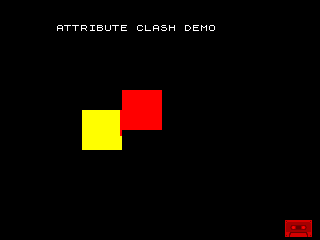
The demo above is about as simple as this gets: draw a solid yellow square,
then draw a solid red square that overlaps it slightly, using ordinary
Sinclair BASIC PLOT commands. If every pixel really had its own
colour, you'd see a clean, even boundary exactly where the two squares'
outlines cross.
That isn't what happens. Zoom into the boundary and the edge is stepped, not smooth — and there's a small notch of red sitting inside what should be solid yellow territory, with a matching notch of background cut into the red. Neither square's actual outline explains those notches. What explains them is the attribute grid: wherever an 8×8 block ends up containing pixels from both squares, the whole block can only carry one ink colour, and whichever square's colour was set into that block last wins — for every pixel in the block, including the ones that were "supposed" to stay the other colour.

Scale that up from two overlapping squares to a moving sprite crossing a coloured background, and the effect is exactly what generations of Spectrum owners learned to recognise: a soft, blocky halo of the wrong colour trailing wherever two things that need different colours end up sharing the same 8×8 cell.
Attribute clash isn't a bug the Spectrum's games had to suffer through by accident — it's a hardware limit every Spectrum programmer had to design around, and the ones who did it well are part of why the machine's library still holds up. Some sprites were drawn in a single flat colour on purpose, so they could move across any background without ever needing a second colour in the same cell. Some games kept moving objects to areas of the screen with a plain, unchanging background colour, so there was never a second colour to clash with. And plenty of games simply let it happen and leaned into the look — a bit of colour bleed around a fast-moving sprite reads, even now, as unmistakably "Spectrum."
The demo above is a 20-line Sinclair BASIC program, tokenised with zmakebas the same way as this site's Tetris in ZX BASIC, and tested by booting the real tape in the Fuse emulator and screenshotting the actual output — not a mockup of what it should look like.
A £10 "untested" rubber-keyed Speccy bought sight unseen in East Java, a government import ban standing between me and a bag of axial capacitors, and a £36 chip for a £10 computer.
The chip inside your Spectrum also ran Pac-Man, half the arcades of the 1980s, the Sega Genesis's sound, and — through a direct descendant — is still inside graphing calculators being sold today. A plain-English guide to the Z80's 48-year career.
Every Spectrum program you've ever typed says OUT 254 or IN 254. The ULA doesn't actually check for 254 — it barely checks anything at all. A tiny program proves it, live, on screen.